Secure free file sharing, and what actually makes it secure
Secure free file sharing is one of those searches where the two words quietly fight each other. Free means somebody else is paying for the storage and the bandwidth. Security costs money. So you'd expect the free options to be the weak ones.
Mostly they aren't. Encryption got cheap and commoditised, and the free tier of a decent product today does the cryptography properly. The problem moved. It is now sitting in the share settings, which almost nobody opens, and in the link itself, which nobody thinks about again after they paste it.
I spent years in growth roles sending decks, proposals and sample reports to people I'd never met. Not once did I worry about the encryption. Plenty of times I wondered who else had ended up with the link.
Free and secure aren't opposites, but they do pull against each other
What free actually costs you is control, not encryption. Free tiers cap file size, drop retention to a week, and quietly remove the settings that matter: expiry dates, revoking access, seeing who opened the thing. Those are the levers that turn a file you sent into a file you still own.
You can tell which company thinks security is a feature and which thinks it's a plan tier by looking at where the expiry setting lives. If it's behind a paywall, security is a plan tier.
What "secure" is actually protecting you from
Three different claims get sold under the same word, and they aren't interchangeable.
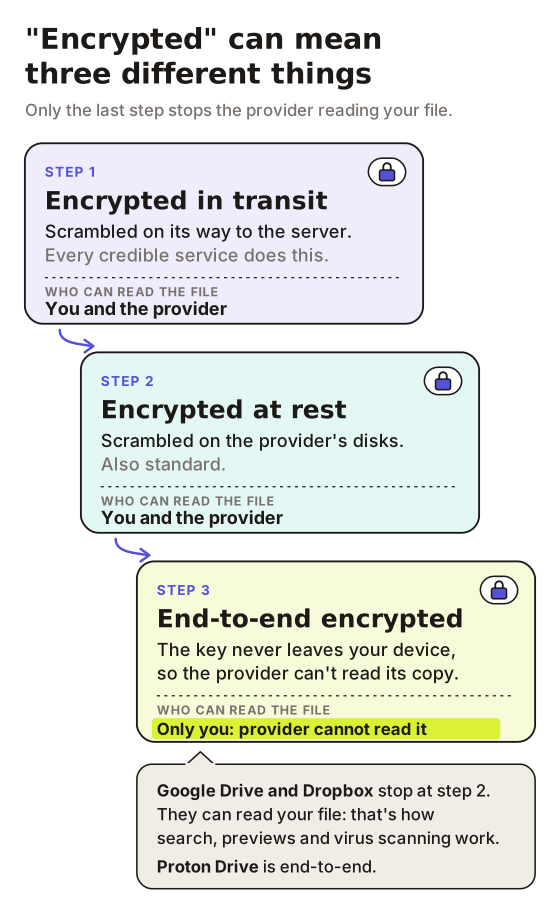
Encryption in transit means the file is scrambled while it travels between your machine and the server. Every credible service does this now. If one doesn't, close the tab.
Encryption at rest means it's scrambled while it sits on their disks. Also standard, and also not a reason to pick one provider over another.
End-to-end encryption means the provider holds a version they cannot read, because the key never leaves your device. This is the real distinction, and it's the one that trips people up: Google Drive and Dropbox encrypt in transit and at rest, but they can read your file. That's not a scandal, it's how search and previews and virus scanning work. It just means "encrypted" on their marketing page and "encrypted" on Proton's mean different things.
For most business documents, in transit and at rest is honestly fine. If you're sending medical records, legal discovery or anything where the provider being compelled to hand it over is a real scenario, you want end-to-end and you should stop reading listicles and go read the provider's threat model. For a fuller rundown of what to reach for instead, see the best way to share confidential documents.
The best secure file sharing tools you can use for nothing
Proton Drive
The one I'd default to for genuine end-to-end. It's built by the Proton Mail people, it's end-to-end encrypted including the file names, and the free account gives you a few gigabytes to play with (5GB at the time of writing, so check before you plan around it). You can create a share link and set a password and an expiry date on the free tier, which is more control than most paid tools hand you.
The catch is that it behaves like encrypted storage, because that's what it is. Sending someone a link means sending them into Proton's viewer, which is fine for a contract and slightly awkward for a proposal you wanted to look polished.
Bitwarden Send
Underrated for the specific job of getting one sensitive thing to one person and having it disappear. It's part of Bitwarden's password manager, it's end-to-end encrypted, and you set a deletion date and a maximum number of views up front. Text sends are free. File sends sit on the paid tier, which is a couple of pounds a month, so it's not free file sharing so much as very cheap file sharing. Once you are paying anyway the question changes shape, and secure file exchange separates the enterprise transfer world from the one most of us are actually in.
The reason I mention it anyway: the mental model is right. A send that expires by default is a much better habit than a link that lives forever and gets forgotten.
Google Drive, Dropbox and OneDrive
The honest answer for most people, most of the time. You already have one, they're encrypted in transit and at rest, and link expiry now exists on the consumer tiers of all three. Set the link to specific people rather than anyone with the link, and you've closed the gap that causes the majority of real-world accidents.
They are not end-to-end. If that matters to your use case, you knew it before you opened this post.
WeTransfer
Good at exactly one thing: shoving a big file at somebody who doesn't want an account. The free tier caps at 3GB, or 10 transfers, in any rolling 30-day window, and the transfer expires on its own, which is a security feature dressed up as a limitation. That allowance goes quickly on sending large audio files, where two stem folders can eat most of a month. It's encrypted in transit and at rest, not end-to-end, though you can put a password on a transfer and limit it to named email addresses without paying, which is more control than the free tier usually gets credit for. Good for the video files, wrong for the contract.
None of this holds behind the Great Firewall, where most of these services are blocked outright: see sending large files to China for free.
Secure free file sharing stops working the moment the link outlives the reason you sent it
Every tool above solves the delivery. Almost none of them solve the afterlife.
You send a proposal in March. In September it's still sitting in an email thread, still live, and that thread has been forwarded twice to people you've never met, one of whom now works at a competitor. Nothing was hacked. The link just did exactly what links do, which is keep working.
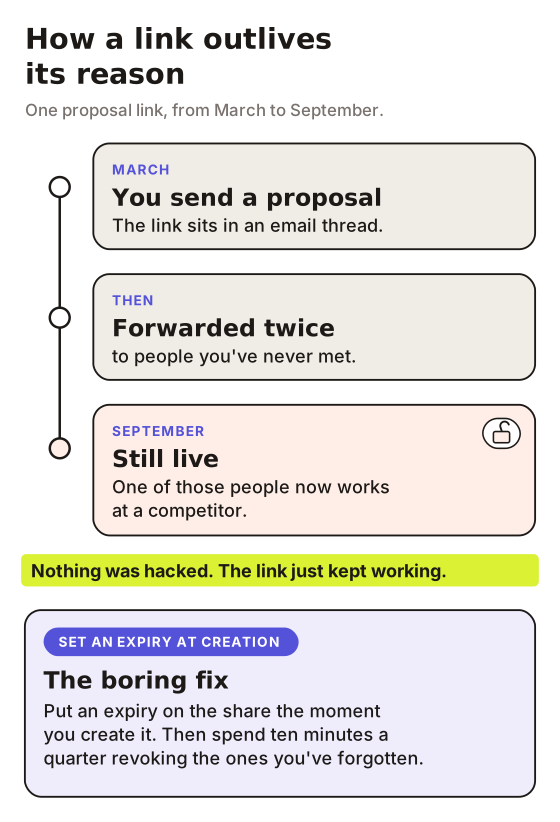
The fix is boring and almost nobody does it: put an expiry on the share at the moment you create it, and spend ten minutes a quarter revoking the ones you've forgotten. That closes more real risk than switching providers ever will.
This is where I'll be upfront about my own bias, since we build in this space. LiveDocument is what I run when a document needs a walkthrough attached rather than just a delivery: you record a video explaining the thing, it sits alongside the PDF or image behind a single link, and you get page-level analytics showing what they actually read. On the security side it does link expiration and revocation, so a share can be switched off after the deal dies. What it does not do is end-to-end encryption, watermarking or NDA gating. If those are your requirements, Proton or a proper data room is your answer and I'd rather say so than pretend otherwise.
How I'd pick, in about thirty seconds
If the file is genuinely sensitive and you need the provider to be unable to read it, Proton Drive.
If it's big and boring and the recipient just needs it, WeTransfer or whatever cloud drive you're already paying for, with the link scoped to named people.
If it's a document you want someone to understand rather than just receive, the encryption isn't your problem. The fact that they'll open it alone with nobody there to explain page four is your problem, and no amount of AES fixes that. I've written more on the practical side of this in the best way to share files with external users.
Common questions about secure sharing of files
Is free file sharing safe for business documents?
Usually, yes. The free tiers of Proton Drive, Google Drive and Dropbox all encrypt properly. The risk in a business context is almost never the encryption, it's a link with no expiry sitting in a forwarded email. Set expiry dates and scope links to named recipients and you've handled most of it.
What's the most secure free file sharing service?
Proton Drive, if you define secure as "the provider cannot read my file". It's end-to-end encrypted on the free tier, including file names, and you can password-protect and expire share links without paying. Whether you need that level depends entirely on what you're sending.
Does password-protecting a file make it secure?
It helps, and it's better than nothing, but people undo it immediately by sending the password in the same email as the link. If you're going to use one, send it through a different channel. A text message counts.
About the Author
Cameron JamesCameron is the founder of LiveDocument. He writes about sharing documents, PDFs, decks and contracts, and why pairing a video walkthrough with a document beats sending it cold.